Bebefinn Baby Care: Kids Game
3.225.00Reviews
Analysis ByAppCompare
I tried Bebefinn Baby Care as a short, child-friendly activity for a shared family device, and my first impression was that it works best when an adult treats it as a guided play session rather than an all-purpose learning platform. The idea is simple: children look after a virtual baby while practicing familiar healthy routines. That makes it easy to understand, especially for younger players who may not be ready for complicated menus, long instructions, or competitive game systems.
The app comes from The Pinkfong Company and sits in the education category, although its presentation is much closer to a gentle babysitting simulation than to a traditional lesson app. It is free to install, rated for Everyone, and has passed one million installs. Its average rating is 3.2 from around 2.4 thousand ratings, which tells me that families are finding some value in it but that the experience is not universally satisfying. I would recommend trying the free portion before deciding whether it deserves a regular place on a child’s device.
How it fits into a shared family routine
In a household with one tablet or phone shared between adults and children, this is the kind of app that can fill a small gap in the day. A child can play while a parent is preparing breakfast, waiting for an appointment, or settling down before bedtime. The baby-care theme gives the session a clear purpose, so it feels more focused than handing over a device with a collection of unrelated videos.
I would not use it as background entertainment for a long stretch. The strongest use case is a brief, supervised turn in which a child chooses an activity, completes it, and then talks about what the virtual baby needed. That conversation is where the educational value becomes more noticeable. Instead of simply watching a character perform a routine, the child can connect the play with washing, eating, resting, and other everyday habits.
Shared-device use also changes how I judge the app. A young child may not understand why an older sibling’s progress, purchases, or choices appear on the same device. Before handing it over, I would check which screen is open and make sure the child is not continuing someone else’s session by accident. This is not a criticism unique to the app; it is a practical boundary for any child-oriented title used by several people.
One realistic scenario is a parent and preschooler spending ten minutes with the app after dinner. The adult lets the child decide what the baby should do, asks why that action is healthy, and then closes the app rather than allowing the activity to drift into an unplanned device session. Used this way, the game becomes a prompt for routine-building, not a substitute for real care or conversation.
What the play style feels like
The babysitting simulation gives children an immediate role. They are not being asked to memorize facts or complete a worksheet; they are responding to a character’s needs through playful actions. That makes the experience approachable for children who lose interest in conventional educational software. The healthy-habits theme is also easier for adults to reinforce because it connects naturally with things already happening at home.
My main reservation is that the concept can feel narrow if a child expects a large world, constant discovery, or more demanding challenges. This is deliberately a gentle experience. It is better suited to repetition and pretend play than to measurable academic progress. Parents looking for reading practice, number work, drawing tools, or a structured curriculum should choose a dedicated learning app instead.
The game’s simplicity is both its advantage and its limit. A child can understand the premise without much explanation, but an older child may quickly notice that the activities are designed for a younger audience. I would place it most comfortably with early learners who enjoy caring for characters, while treating the Everyone rating as a broad content classification rather than a promise that every child will find the gameplay equally engaging.
Setting boundaries before the first session
The app is free to download, but it includes in-app purchases ranging from $6.99 to $109.99 per item. That is the most important household detail to handle before a child starts playing. I would never pass over a shared device without checking the purchasing setup first, especially when the child can navigate independently. The free entry point is useful for testing the fit, but families should decide in advance whether purchases are allowed at all.
I also recommend agreeing on a simple handover routine. The adult opens the app, confirms that the correct child is using the device, and explains that any purchase or unusual prompt requires permission. This is more reliable than assuming a young player will recognize a payment screen or understand the difference between playing and buying. Keeping the conversation calm makes the rule easier to follow than presenting the device as a source of hidden traps.
Because the app is intended for everyone, it may appear suitable for a wide range of children, but age context still matters. A toddler may need an adult to interpret instructions and guide taps. A preschooler may enjoy choosing care activities independently but still need reminders about device limits. An early primary-school child may understand the routines yet find the simulation too basic. I would judge readiness by the child’s ability to follow a short sequence and ask for help, not only by the age label.
The app runs on Android devices using at least version 7.1, so compatibility is reasonably broad for older supported phones and tablets. Its current version is 0.42. On a shared household device, I would still test the app before a planned trip or appointment rather than discovering a compatibility or performance issue when the child is already expecting to play. That small check also gives the adult a chance to understand the opening flow.
Account and device habits that matter
I would keep the app on a device with a clear household purpose, rather than mixing it into an adult’s work phone if possible. A child who is allowed to browse freely may encounter unrelated notifications or settings, while a dedicated family tablet keeps the session easier to supervise. This is not a feature claim about the game; it is simply the safest way I would organize shared use.
I would also avoid treating one child’s play as a record for the whole family. If siblings take turns, they should know that the game is a shared activity unless the device clearly separates their progress. That distinction prevents arguments about who completed an action or changed the current state. When a game is centered on caring for a baby, cooperation can be more valuable than competing over the device.
Another useful habit is to end the session at a natural stopping point. After a care activity, the adult can ask the child to describe what happened and then return the device. This avoids the common pattern in which the child keeps tapping simply because the next screen is available. It also turns a potentially passive session into a small exercise in recall and communication.
Coordinating play between adults and children
I found that the app makes more sense when the adult takes the role of a conversation partner instead of a technical supervisor. Questions such as “What does the baby need now?” or “Why would that be helpful?” encourage the child to connect the pretend action with a real habit. The adult does not need to give a lesson after every tap; one or two thoughtful questions are enough to make the activity feel purposeful.
This approach is especially useful when several adults share responsibility for the child. A parent, grandparent, or babysitter can use the same basic routine: let the child lead, step in when a prompt is confusing, and finish with a short real-world reminder. The app does not need to become a formal teaching plan. Its strength is that it offers a common starting point for adults who want to reinforce healthy behavior consistently.
Coordination also means agreeing on what the app is not. I would not describe the virtual baby as a realistic model of childcare, and I would not expect a child to transfer every game action directly into independent behavior. Real hygiene, meals, sleep, and safety still require adult guidance. The simulation can make those topics less abstract, but it should remain a playful illustration rather than an authority.
For siblings, I would encourage taking turns choosing the next activity instead of letting the fastest tapper control everything. A younger child may need more time to understand the screen, while an older sibling may be tempted to finish the sequence. Giving each child a defined role keeps the session calmer and makes the game feel cooperative. If that arrangement becomes difficult, the app is probably better used one child at a time.
When the free version is enough to judge
I would spend the first few sessions evaluating three things: whether the child understands the care theme, whether the activities hold attention without constant prompting, and whether the app fits the family’s purchasing boundaries. Those observations are more useful than relying only on the rating. The 3.2 average suggests mixed experiences, so I would not assume that popularity guarantees a smooth fit for a particular child.
If the child enjoys the basic interaction but asks for more variety, that is the point to consider whether any optional spending is worthwhile. I would make that decision as an adult, after checking what is being offered and whether it adds meaningful play rather than simply extending screen time. The upper end of the listed purchase range is substantial for a child-focused app, so I would be particularly cautious about buying out of pressure or impatience.
Families should also decide whether the app belongs in a quiet routine or an active learning moment. It can work before a bath, after washing hands, or during a calm transition, when the theme naturally matches the child’s day. It is less useful as a distraction during a stressful moment if the adult cannot stay nearby. The game may occupy attention, but it does not remove the need for supervision or emotional support.
Age, trust, and choosing the right alternative
The Everyone rating makes the app approachable for a family audience, but trust still comes from how the household uses it. Younger children may tap quickly, misunderstand prompts, or ask for something without knowing whether it involves a purchase. Older children may understand those boundaries but outgrow the gentle simulation. In both cases, an adult’s expectations matter more than the label alone.
Compared with ordinary cartoons, the app gives the child more agency. The child is making choices for a character rather than only watching one. Compared with a structured early-learning app, however, it offers less obvious academic progression. Compared with a digital pet game, its focus on healthy routines gives it a clearer educational angle, but it may not provide the same sense of long-term collection or open-ended attachment that keeps older players returning.
That comparison helped me place it correctly. I would choose this app for a child who likes pretend caregiving and benefits from seeing daily habits represented through play. I would choose a literacy or numeracy app for a child who needs targeted practice. I would choose a simple video or audio activity when the adult cannot supervise interaction. I would choose a more expansive simulation for a child who wants deeper customization and longer-term goals.
There is also a difference between introducing a habit and maintaining one. A virtual baby can make the first conversation about handwashing, food, rest, or care feel inviting. It cannot guarantee that the child will remember the habit later. The best result comes when the adult immediately links the game to something concrete, such as washing hands before a snack or preparing for bedtime. Without that bridge, the educational message may remain inside the screen.
I would skip it for households that want a completely hands-off experience, dislike in-app purchase systems, or need strong educational measurement. I would also skip it for children who become frustrated by repeated care routines or who are already looking for complex challenges. The app is not a poor choice because it is simple; it is a poor choice when simplicity does not match the child or the family’s expectations.
My household verdict
After looking at the app as a shared-device experience, I see Bebefinn Baby Care as a pleasant, focused option for short sessions with younger children. Its best quality is the way it turns familiar healthy habits into pretend responsibility. That gives adults an opening to talk, demonstrate, and connect screen play with daily life. The game is most effective when the child is not left alone with it for an undefined period.
The practical cautions are just as important. The free download should be tested before any purchase, and the in-app purchase range means adults need to establish clear boundaries first. Shared devices require simple handover rules, especially when siblings take turns. The Everyone rating makes the content broadly approachable, but it does not remove the need to consider maturity, attention span, and the child’s ability to ask for help.
The Pinkfong Company has made something easy to approach, but the modest average rating and the gentle scope suggest that this will not be a universal favorite. I would recommend it to families seeking a small, conversation-friendly activity about healthy routines, not to anyone expecting a complete early-learning curriculum or a deep simulation. For my household verdict, the right way to use this app is as a supervised prompt for real-world habits, not as a replacement for them.
Since it is free to begin and supports devices running Android 7.1 or later, it is reasonable to try it cautiously on a family device. Give the child a short, clearly bounded session, observe whether the care theme genuinely interests them, and decide afterward whether it deserves regular use. If the child enjoys making choices for the virtual baby and the adults are comfortable managing the purchase boundaries, it can earn a useful place in a shared routine. If not, a more targeted educational tool or a simpler offline activity will probably serve the household better.
FAQ
What is Bebefinn Baby Care: Kids Game?
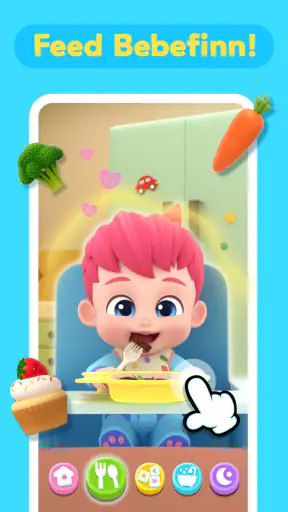
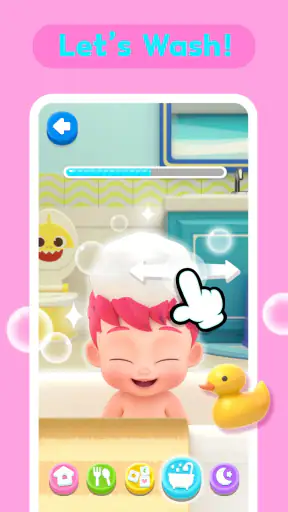
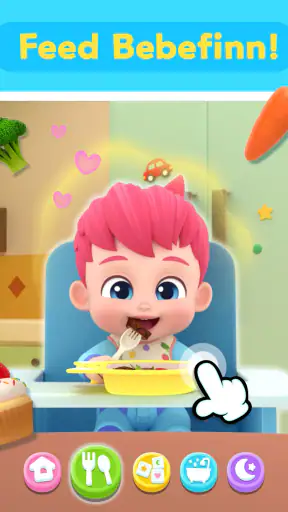
Bebefinn Baby Care: Kids Game is a colorful, child-friendly app based on the popular Bebefinn characters. It offers simple interactive activities that let children care for virtual babies, complete everyday routines, and enjoy playful animations. The game is designed mainly for preschool-aged children and focuses on familiar tasks such as feeding, bathing, dressing, and putting the baby to sleep.
Is Bebefinn Baby Care suitable for young children?
The game is generally aimed at toddlers and preschoolers, with easy controls, bright visuals, and activities that do not require advanced reading or gaming skills. Younger children may still need help navigating menus or understanding certain tasks. Parents should check the recommended age rating, language options, and available content on their child’s device before downloading.
Does Bebefinn Baby Care: Kids Game require an internet connection?
Some parts of the game may work without a continuous internet connection after installation, which is useful for travel or offline play. However, an internet connection may be needed for downloading the app, receiving updates, loading advertisements, or accessing optional content. Availability can vary by version, device, and region, so parents should test the game offline before relying on it.
Are there advertisements or in-app purchases in the game?
Parents should review the store listing carefully because the availability of advertisements, paid items, subscriptions, or locked activities can differ between versions of Bebefinn Baby Care. Even when the main game is free to download, optional purchases may be offered. To avoid accidental spending, it is best to enable parental controls and require authentication for every purchase.
What should parents know about privacy and screen time?
Before installing Bebefinn Baby Care, parents should check the app’s privacy information and permissions to understand what data may be collected and how it is used. The game is intended as light entertainment rather than a replacement for real interaction or caregiving. Setting a reasonable play-time limit and playing together occasionally can make the experience safer, more balanced, and more enjoyable.
Pros
- Simple activities help toddlers practice basic care routines.
- Bright animations and friendly characters keep young children engaged.
- Easy tap-based controls are suitable for preschoolers.
- Short play sessions work well for quick entertainment.
- Offline access makes it useful during travel or waiting times.
Cons
- Some activities may feel repetitive after several play sessions.
- Limited challenge may not keep older children interested for long.
- In-app purchases can be a concern for parents.
- Requires device storage for the app and downloaded content.
- Frequent animations and sounds may be overstimulating for some children.